Concept and Features
Music through character interaction
Each alien performs its musical role. Larger characters manage the main voices, while smaller ones include supplementary tracks.
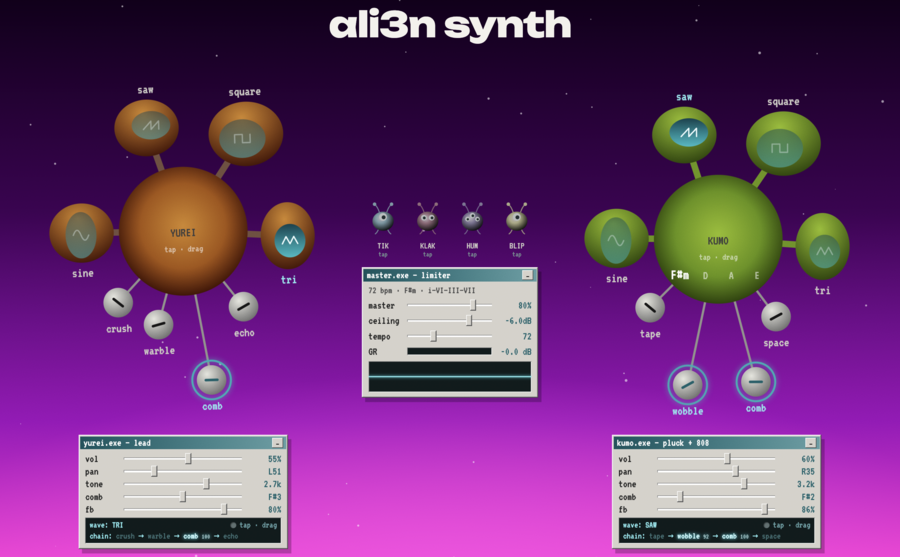
The character’s body triggers the sound, the eyes select the waveform, and the appendages control the effects. The characters respond to the sound through movement.
The tool allows users to gradually compose and modify the track in real time.
Two Primary Voices
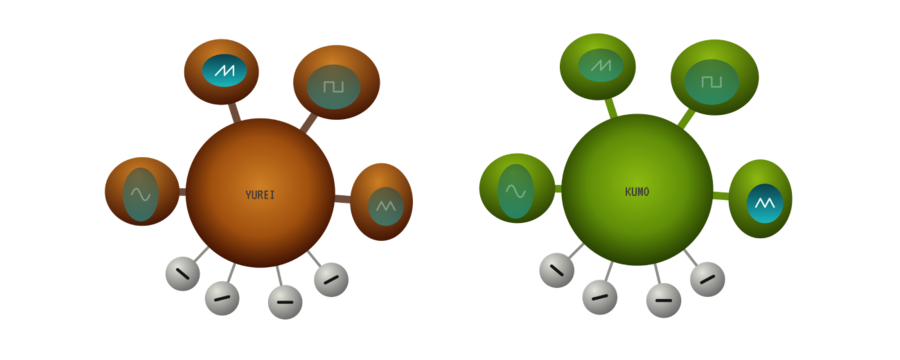
YUREI plays a melody. The sound with vibrato smoothly transitions between notes. To change the pitch, you must drag the character up or down.
KUMO plays chords, arpeggios, and 808 bass. Dragging up or down cycles through the chords F#m, D, A, and E.
Volume, panning, timbre, and effects are set separately for each voice.
prompt
Two aliens for the ali3n synth musical synthesizer.YUREI, orange-brown, is responsible for the melody. KUMO, green, is responsible for the chords and bass.Each has a round body and four eyes on thick stalks. The eyes are of different sizes, with turquoise pupils. Inside the pupils are wave pattern markings: sine, saw, square, and triangle.Below are four thin gray stalks with round, silvery knobs. Each has a short dark line.Simple forms, colored gradients, highlights on top, and darkening toward the edges. The name YUREI or KUMO is on the body.
Additional Tracks
Four small aliens add parts to the composition.
TIK plays the hi-hats.
KLAK adds the clap.
HUM draws a choral chord and follows KUMO’s harmony.
BLIP emits short, alien sounds.
Pressing toggles the track on and off. All parts play in the same tempo. The default is 72 BPM.
prompt
Create four small aliens.
TIK is blue, with one eye. It plays the hi-hats. KLAK is pink, with two eyes. It plays the clap. HUM is lavender, with three eyes. It is responsible for the chorus. BLIP is yellow, with one eye. It adds short sounds.
All have a round body, two thin antennas with ball tips, and two short, curved legs. Their eyes are light, with dark teal pupils. They have no mouths.
In appearance, they should complement YUREI and KUMO. Simple shapes, colored gradients, a top highlight, and darker edges. They should all be the same size, viewed from the front. Each one separately, on a transparent background, and without labels.
Settings panels
The YUREI and KUMO panels allow for independent adjustment of volume, panning, timbre, and comb filter for each voice. The selected waveform and effects chain are shown below.
The master panel controls overall volume, tempo, and limiter threshold. The GR indicator shows how much the limiter is attenuating the signal, and the oscilloscope displays the sound’s waveform.
prompt
Design three sound control panels for ali3n synth: yurei.exe, kumo.exe, and master.exe. The body should be light gray with rounded edges, featuring a turquoise strip across the top, the window title on the left, and a minimize button on the right. Use a pixel font.In the YUREI and KUMO panels, place five horizontal sliders: vol, pan, tone, comb, and fb. Labels should be on the left, and values on the right. At the bottom, include a dark area showing the selected waveform and the effects chain. YUREI requires crush, warble, comb, and echo. KUMO requires tape, wobble, comb, and space.In the master panel, place sliders for master, ceiling, and tempo. Below these, include a GR indicator and a dark oscilloscope field with a thin turquoise line.All three panels must share a unified aesthetic and be viewed from the front. Each panel must be displayed individually on a transparent background.
Visual Style
The design blends cosmic elements with vintage computer windows. The background features a colorful gradient, particles, and a touch of grain. The aliens appear three-dimensional due to highlights and darkening around the edges.
YUREI is orange, and KUMO is green. The smaller aliens also have distinct colors to make them easier to differentiate.
We chose «Unbounded» for the title, while the VT323 pixel font is used for captions and settings.
When a character speaks, their body pulsates, and their eyes flash.
Effect Chains and Stereos
Every voice has its own chain of effects. YUREI uses crush, warble, comb, and echo. KUMO uses tape, wobble, comb, and space.
YUREI is shifted left, and KUMO is shifted right. The panorama is set separately for each voice. Then the sound feeds into the master panel.
How the tool works
The tool is built with React and Tone.js. React handles the interface and parameter control, while Tone.js generates the sound, processes effects, and synchronizes tracks.
Two primary voices and four additional tracks feed into a unified output, which includes volume control and a limiter.
Interface Components
Each main voice consists of a character and a settings panel. Between them are additional tracks and a master panel.
The component names describe their function: Creature manages the character, Eye controls the waveform selection, FxKnob handles effects, VoicePanel governs voice settings, MicroAlien relates to the little aliens, and MasterPanel manages the overall sound.
In the code, component names are written in PascalCase, such as VoicePanel. CSS classes define the block and its parts, for example, alien__panel.